Visual RAG
Introduction
Visual RAG is a beta feature. If you are interested in being an early bird and trying it out, you are most welcomed to contact: AlFoundation@t-systems.com
This document introduces our Visual RAG API and outlines how to upload, operate and ingest files to the VisualRAG system and perform searches. The API is compatible with the OpenAI API standard.
Our Visual RAG indexes your file in both text and image. By combining the two indexing methods, it is able to take the best of both worlds: The stability of text indexing as well as the flexibility and informativeness of visual indexing. Compared to conventional text-based RAG systems, Visual RAG can retrieve information that only exists in graphs or charts — something text-based approaches often miss. Moreover, Visual RAG can typically overcome various file parsing issues that currently text-RAGs struggle with. For example, parsing tables in PDF files, or parsing paragraphs under free format such as PPTX.
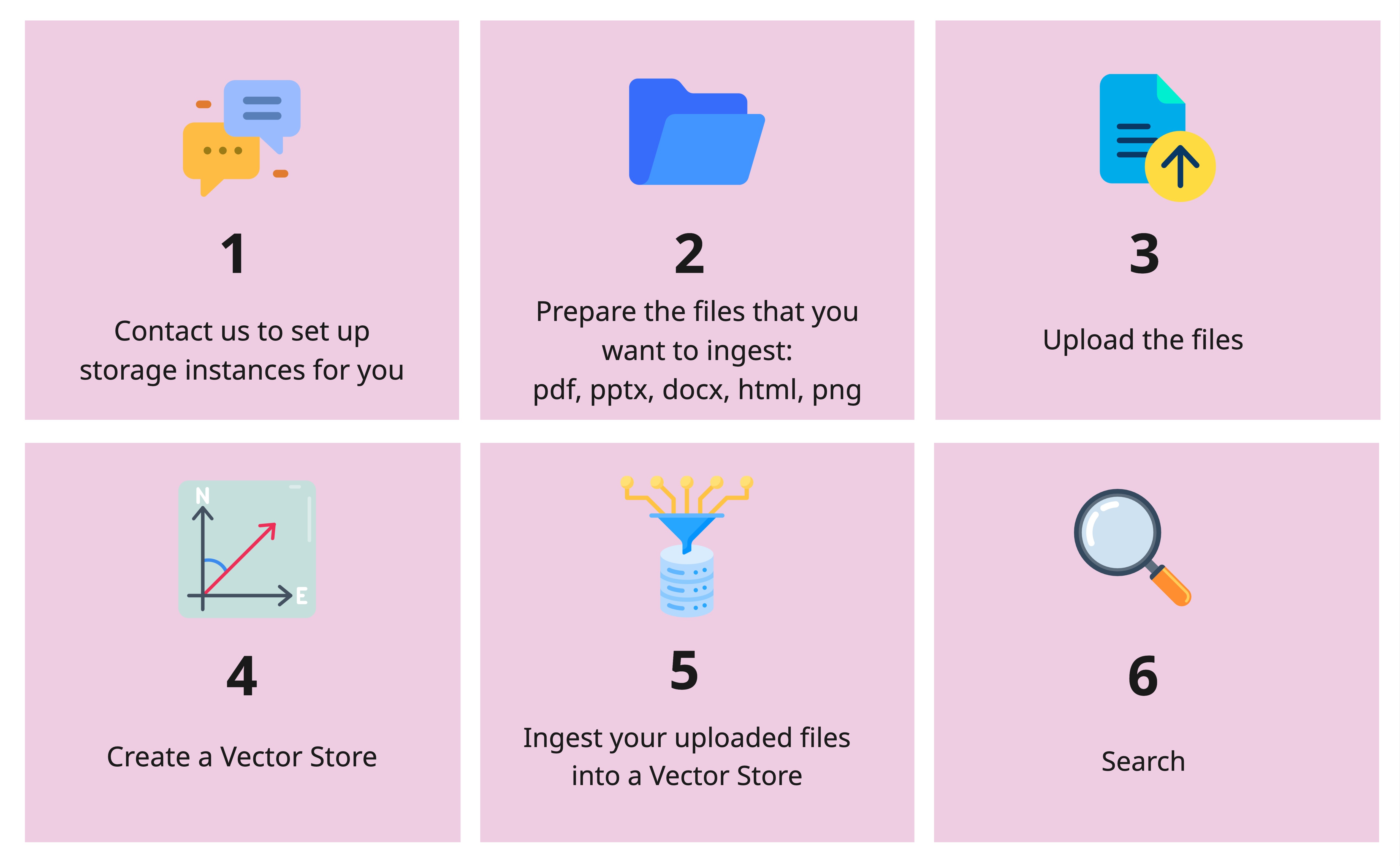
Visual RAG API workflow
Visual RAG supports the following formats: PDF, PPTX, DOCX, HTML, and PNG.
Set-ups
To have access to this feature, you need to firstly contact: AlFoundation@t-systems.com. We will deploy a safe and isolated storage instance just for your project.
Once you get a "ready" signal from us, you can prepare your environment by doing the following:
Dependencies requirements
pip install openai
Setting Environment Variables
First, set the environment variables for the API base URL and API key.
In terminal:
export API_BASE=https://llm-server.llmhub.t-systems.net/v1
# Adding LLMHUB API key
export API_KEY=YOUR_API_KEY
# Testing the API_KEY
curl -H "Authorization: Bearer $API_KEY" $API_BASE/models
Initialize the Client
Initialize the OpenAI client with the API key and base URL.
In Python:
import os
from openai import OpenAI

api_base = os.getenv('API_BASE')
api_key = os.getenv('API_KEY')

client = OpenAI(
    api_key=os.getenv('API_KEY'),
    base_url=os.getenv('API_BASE')
)
Files Operations
To upload a file
To upload a file for visual-rag purposes, provide "purpose" as "visual-rag".
file_path = "/path/to/your_file.pdf"
client.files.create(
  file=open(file_path, "rb"),
  purpose="visual-rag"
)
This would return a FileObject containing the file id for the file you just uploaded.
Output:
FileObject(id='file-abc123', bytes=1, created_at='2024-10-22T15:10:45.770750+02:00', filename='your_file.pdf', object='file', purpose='visual-rag', status='uploaded', expires_at=None, status_details=None, userId='your_user_id', groupId='your_group_id', createdAt='2024-10-22T15:10:45.770750+02:00', projectId='your_project_id')
Request Body
file file: Required
The File object (not the file name) to be uploaded.
purpose string:Required
The intended purpose of the uploaded file. Use "visual-rag" for Visual RAG.
To Get the Information of a File
file_id='file-abc123'
client.files.retrieve(file_id)
Output:
FileObject(id='file-abc123', bytes=1, created_at='2024-10-22T15:10:45.770750+02:00', filename='your_file.pdf', object='file', purpose='visual-rag', status='uploaded', expires_at=None, status_details=None, userId='your_user_id', groupId='your_group_id', createdAt='2024-10-22T15:10:45.770750+02:00', projectId='your_project_id')
Request Body
file_id string: Required
The id of the file to be retrieved. This ID can be obtained from the list files function.
List All Uploaded Files
# Iterate over the files and print their details
file_list = client.files.list(purpose="visual-rag")
for file_obj in file_list.data:
    print(f"ID: {file_obj.id}")
    print(f"Bytes: {file_obj.bytes}")
    print(f"Created At: {file_obj.created_at}")
    print(f"Filename: {file_obj.filename}")
    print(f"Object: {file_obj.object}")
    print(f"Purpose: {file_obj.purpose}")
    print("-" * 40)
Output:
ID: file-abc123
Bytes: 1
Created At: 2024-10-22T15:10:45.770750+02:00
Filename: your_file.pdf
Object: file
Purpose: visual-rag
----------------------------------------
Delete File
Delete a specific file by its ID.
file_id = "file-abc123"
client.files.delete(file_id)
Output:
FileDeleted(id='file-abc123', deleted=True, object='file')
Request Body
file_id string: Required
The ID of the file to be deleted. This ID can be obtained from the list files function.
Vector Stores Operations
After you sorted out the file-upload, it is time to ingest the files into your vector database. To do that, you firstly need to create a vector store.
Create a Vector Store
client.vector_stores.create(
    name="my_vs",
    chunking_strategy={
        "text_embedding_model": "text-embedding-bge-m3", # replace with the embedding models of your choice
        "vision_embedding_model": "tsi-embedding-colqwen2-2b-v1" # replace with the embedding models of your choice
    }
)
Output
VectorStore(id='xyz-456', created_at='2025-11-28T09:32:37.776386', file_counts=FileCounts(cancelled=0, completed=0, failed=0, in_progress=0, total=0), last_active_at=None, metadata={'text_embedding_model': 'text-embedding-3-large', 'vision_embedding_model': 'tsi-embedding-colqwen2-2b-v1'}, name='my_vs', object='vector_store', status='completed', usage_bytes=0, expires_after=None, expires_at=None)
Request Body
name string: Required
The name of your vector store. The name has to be unique among all the vector stores that you created.
chunking_strategy dictonary: Required
Contains the models for indexing in both ways: the value for text_embedding_model and vision_embedding_modelshould be the model name of a text embedding model and vision embedding model of your choice.
List All Vector Stores
vector_stores_list = client.vector_stores.list()
for vector_store in vector_stores_list:
    print(vector_store.name)
    print(vector_store.id)
    print(vector_store.file_counts)
    print("-" * 40)
Output
my_vs
xyz-456
FileCounts(cancelled=0, completed=0, failed=0, in_progress=0, total=0)
----------------------------------------
Ingest a File to a Vector Store
vs_id = "xyz-345"
file_id="file-abc123"
client.vector_stores.files.create(
    vector_store_id=vs_id,
    file_id= file_id,
    chunking_strategy={
        "chunk_size": 1024,
        "chunk_overlap": 100,
    }
)
Output
VectorStoreFile(id='file-abc123', created_at='2025-12-01T13:36:04.483091', last_error=None, object='vector_store.file', status='completed', usage_bytes=0, vector_store_id='xyz-456', attributes=None, chunking_strategy=None)
Request Body
vector_store_id string: Required
The id of your vector store. This can be retrieved by using the vector_store.list function.
file_id String: Required
The id of your file. This can be retrieved by using the files.list function.
chunking_strategy dictonary: Optional
Contains the chunking parameters: chunk_size defines the size of the chunk during ingestion. Defaults to 1024. chunk_overlap defines the overlap size between chunks. Defaults to 100.
List All Ingested Files
vs_id = "xyz-456"
vs_file_list = client.vector_stores.files.list(
    vector_store_id=vs_id
)

for file in vs_file_list.data:
    print(file.id)
    print(file.vector_store_id)
    print(file.created_at)
    print("-" * 40)
Output
file-abc123
xyz-456
2025-12-01T13:36:04.483000
----------------------------------------
Request Body
vector_store_id string: Required
The id of your vector store. This can be retrieved by using the vector_store.list function.
Get the Information for an Ingested File
vs_id = "xzy-456"
file_id="file-abc123"
client.vector_stores.files.retrieve(
    vector_store_id=vs_id,
    file_id= file_id
)
Output
VectorStoreFile(id='file-abc123', created_at='2025-11-28T10:09:17.583000', last_error=None, object='vector_store.file', status='in_progress', usage_bytes=0, vector_store_id='xyz-456', attributes=None, chunking_strategy=None)
Request Body
vector_store_id string: Required
The id of your vector store. This can be retrieved by using the vector_store.list function.
file_id String: Required
The id of your file. This can be retrieved by using the files.list function.
Delete an Ingested File from a Vector Store
vs_id = "my_vs"
file_id="file-abc123"
client.vector_stores.files.delete(
    vector_store_id=vs_id,
    file_id=file_id
)
Output
VectorStoreFileDeleted(id='file-abc123', deleted=True, object='vector_store.file.deleted')
Request Body
vector_store_id string: Required
The id of your vector store. This can be retrieved by using the vector_store.list function.
file_id String: Required
The id of your file. This can be retrieved by using the files.list function.
Delete a Vector Store
vs_id = "xyz-456"
client.vector_stores.delete(
    vector_store_id=vs_id
)
Output
VectorStoreDeleted(id='xyz-456', deleted=True, object='vector_store.deleted')
Request Body
vector_store_id string: Required
The id of your vector store. This can be retrieved by using the vector_store.list function.
Retrieval
vs_id = "xyz-456"
USER_QUERY = "Which new features are supported in this DeepStream SDK?"

results = client.vector_stores.search(
    vector_store_id=vs_id,
    query=USER_QUERY,
    extra_body = {
        "top_k_texts": 1,
        "top_k_images": 1,
    }
)

for result in results:
    print(result)
Output
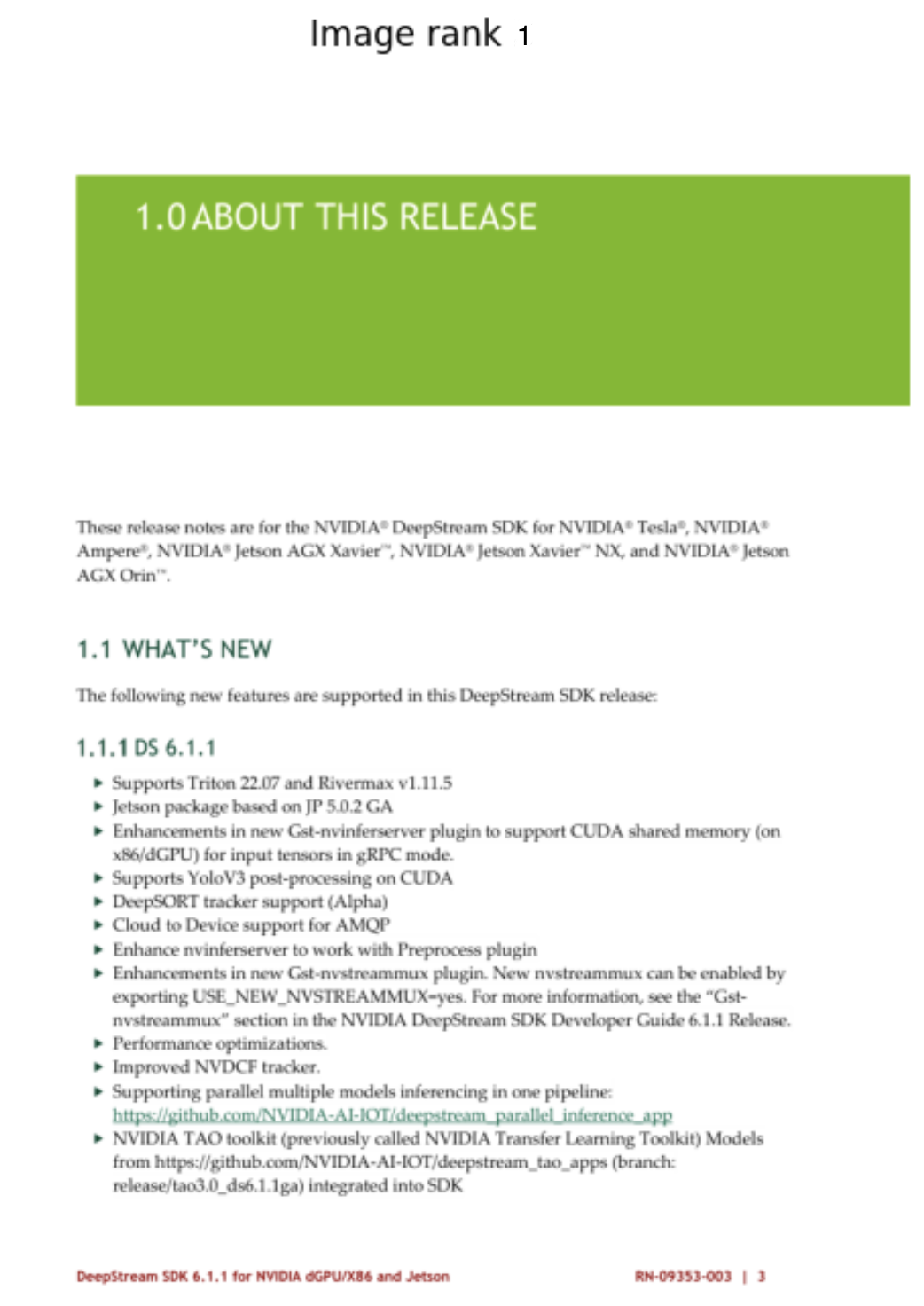
VectorStoreSearchResponse(attributes=None, content=[Content(text='data:image/png;base64,iVBORw0KGgoAAAANSUhEUgAAAxgAAAQACAIAAADtPWhLAAEAAElEQVR4nOzdd1wTSf8H8EkgJHQQREQR...', type='base64')], file_id='a7043277-3d7d-4819-b649-19d2c1846a2c', filename='DeepStream_6.1.1_Release_Notes.pdf', score=13.937369, file_type='.pdf', created_at='2025-11-28 08:06:42', page_number=3)
VectorStoreSearchResponse(attributes=None, content=[Content(text='DeepStream SDK 6.1.1 for NVIDIA dGPU/X86 and Jetson \nRN-09353-003...', type='text')], file_id='26c4e04b-bc5f-4223-969f-ab0abe4df445', filename='llm-serving-prod-visual-rag/fe35f211-37a4-4c5c-93c9-119c8d3aa7b7/file-c098a4b0a5c442439c48a2b65e6cf757.pdf', score=0.7358146, file_type='.pdf', created_at=None, page_number=3)
Request Body
vector_store_id string: Required
The id of your vector store. This can be retrieved by using the vector_store.list function.
query string: Required
The query that you use to search through the vector store.
extra_body Dictionary: Optional
- top_k_texts integer: Return the top k search results from text searching.
- top_k_image integer: Return the top k search results from image searching.
Check out the Text Search Results:
for result in results:
    if result.content[0].type=="text":
        print("==========================")
        print(result.content[0].text)
Output
==========================
DeepStream SDK 6.1.1 for NVIDIA dGPU/X86 and Jetson
RN-09353-003 | 3
1.0 ABOUT THIS RELEASE
These release notes are for the NVIDIA® DeepStream SDK for NVIDIA® Tesla®, NVIDIA®
Ampere®, NVIDIA® Jetson AGX Xavier™, NVIDIA® Jetson Xavier™ NX, and NVIDIA® Jetson
AGX Orin™.
1.1 WHAT’S NEW
The following new features are supported in this DeepStream SDK release:
DS 6.1.1
Supports Triton 22.07 and Rivermax v1.11.5
Jetson package based on JP 5.0.2 GA
Enhancements in new Gst-nvinferserver plugin to support CUDA shared memory (on
x86/dGPU) for input tensors in gRPC mode.
Supports YoloV3 post-processing on CUDA
DeepSORT tracker support (Alpha)
Cloud to Device support for AMQP
Enhance nvinferserver to work with Preprocess plugin
Enhancements in new Gst-nvstreammux plugin. New nvstreammux can be enabled by
exporting USE_NEW_NVSTREAMMUX=yes. For more information, see the “Gst-
nvstreammux” section in the NVIDIA DeepStream SDK Developer Guide 6.1.1 Release.
Performance optimizations.
Improved NVDCF tracker.
Visualize the Image Search Results:
from PIL import Image
import numpy as np
import base64
import io
from io import BytesIO
import matplotlib.pyplot as plt

def encode_image(image_path):
  with open(image_path, "rb") as image_file:
    return base64.b64encode(image_file.read()).decode('utf-8')

def load_image_from_base64(base64_string) -> Image.Image:
    # Decode the base64 string
    return Image.open(BytesIO(base64.b64decode(base64_string)))

def visualize_images(image_list: list[Image.Image], num_images: int = 5):
    if not isinstance(image_list, list):
        image_list = [image_list]
    # Determine how many images to show (up to 8)
    num_images = min(num_images, len(image_list))

    # Create a figure with subplots
    fig, axes = plt.subplots(1, num_images, figsize=(15, 10))

    # If there's only one image, axes won't be an array, so we convert it to a list
    if num_images == 1:
        axes = [axes]

    # Load and display each image
    for i, ax in enumerate(axes):
        img = image_list[i]
        # Display the image
        ax.imshow(img)
        ax.axis("off")

        # Add a title with the image number
        ax.set_title(f"Image rank {i+1}")

    plt.tight_layout()
    plt.show()
Output
End-to-End
Initialize two clients, one for retrieval in RAG, one for the LLM inference.
from openai import OpenAI

rag_client = OpenAI(
    api_key=os.getenv('API_KEY'),
    base_url=os.getenv('API_BASE')
)
llm_client = OpenAI(
    api_key=os.getenv('API_KEY'),
    base_url=os.getenv('API_BASE')
)
PROMPT_TEMPLATE="""
You are an Retrieval Augmented Generation assistant.
You are given a query and a set of context documents that are in text and image format.
Your task is to answer the query based on the context documents.
The text documents are:
{text_contexts}

Please pay attention and base on given both texts and images to answer following the query:
{query}
The answer should be in the same language as the query.
"""

def construct_message(
    query: str,
    contexts: list,
    prompt_template: str = PROMPT_TEMPLATE,
) -> dict:
    """
    Construct a message dictionary from the query results.

    Args:
        query_results (list): The results from the query

    Returns:
        dict: The constructed message
    """
    image_contexts = []
    text_contexts = ""

    for context in contexts:
        if context.content[0].type == "text":
            text_contexts += context.content[0].text.strip() + "\n\n"
        elif context.content[0].type == "base64":
            base64_image = context.content[0].text
            image_contexts.append(
                {
                    "type": "image_url",
                    "image_url": {
                        "url": base64_image
                    }
                }
            )
        else:
            print(f"Unknown content type: {context.content[0].type}")
            continue

    prompt = prompt_template.format(query=query, text_contexts=text_contexts)
    content = [
                {
                    "type": "text",
                    "text": prompt
                }
            ]
    content += image_contexts

    messages=[
        {
            "role": "user",
            "content": content,
        }
    ]

    return messages


def get_answer_from_llm(
    query: str,
    llm: str,
    rag_client: OpenAI,
    llm_client: OpenAI,
    top_k_texts: int,
    top_k_images: int,
    vector_store_id: str,
) -> str:
    """
    Get an answer from the LLM using the provided query.

    Args:
        query (str): The query to ask the LLM
        rag_client (OpenAI): The RAG client
        llm_client (OpenAI): The LLM client

    Returns:
        str: The answer from the LLM
    """
    try:
        contexts = rag_client.vector_stores.search(
            vector_store_id=vector_store_id,
            query=query,
            extra_body={
                "top_k_images":top_k_images,
                "top_k_texts":top_k_texts,
            }
        )
        messages = construct_message(query, contexts)
        chat_response = llm_client.chat.completions.create(
            model=llm,
            messages=messages,
            temperature=0.1,
            max_tokens=2048,
            stream=False,
        )
        answer = chat_response.choices[0].message.content.strip()

        return answer, messages, contexts

    except Exception as e:
        print(f"Error getting answer from LLM: {str(e)}")
        return None, None, None
answer, messages, contexts = get_answer_from_llm(
    query="Which new features are supported in this DeepStream SDK?",
    llm="claude-sonnet-4.5",
    rag_client=rag_client,
    llm_client=llm_client,
    top_k_texts=5,
    top_k_images=3,
    vector_store_id="xyz-456"
)
answer
Output
'# New Features Supported in DeepStream SDK\n\nBased on the release notes, the DeepStream SDK includes the following new features:\n\n## DeepStream 6.1.1 Features:\n\n- **Triton 22.07 and Rivermax v1.11.5 support**\n- **Jetson package based on JP 5.0.2 GA**\n- **Enhanced Gst-nvinferserver plugin** - supports CUDA shared memory (on x86/dGPU) for input tensors in gRPC mode\n- **YoloV3 post-processing on CUDA**\n- **DeepSORT tracker support (Alpha)**\n- **Cloud to Device support for AMQP**\n- **Enhanced nvinferserver** - works with Preprocess plugin\n- **Enhanced Gst-nvstreammux plugin** - can be enabled by exporting USE_NEW_NVSTREAMMUX=yes\n- **Performance optimizations**\n- **Improved NVDCF tracker**\n- **Parallel models inferencing** in one pipeline\n- **NVIDIA TAO toolkit integration** (previously called NVIDIA Transfer Learning Toolkit)\n\n## DeepStream 6.1 Features:\n\n- **Ubuntu 20.04 and GStreamer 1.16 support** (both on dGPU/x86 and Jetson)\n- **Triton 22.03 support**\n- **Stereo depth camera support**\n- **NMOS (Networked Media Open Specifications) support**\n\n## New Plugins:\n\n- **Gst-nvdsucx plugin** - to send and receive data over RDMA\n- **Gst-nvds3dfilter plugin** - for stereo depth camera\n- **Gst-nvdspostprocess plugin** - for separate postprocessing on inference output\n\n## Python Bindings Updates:\n\n- New sample application: **deepstream-demux-multi-in-multi-out**\n- Updated Jupyter notebook: **deepstream_test_4.ipynb**'